Do we need an asia specific app?

A sprint design week in Taiwan
USER RESEARCH
UX DESIGN
CMS
TIME FRAME
Q2 2025
ROLE
Co-Organiser
Researcher
Designer
TOOLS
Miro
Figma
PLATFORM
App

_Overview

Background

With a growing number of app users in North Asia, IKEA NA is considering the launch of an Asia-specific app to better cater to the unique needs of users. However, the question remains: Do we really need an Asia-specific app, and how do we decide?

To answer this, we co-hosted a week-long design sprint with the global team to explore this possibility, identify key differences between Western and Asian app experiences, and determine the best path forward.

Objective

Before the workshop, we aligned on three key aspects that would guide our decision-making through user testing:

UI Layout

Content

Upper funnel functionality

_Discovery

Setting the Stage

In preparation for the workshop, we collaborated closely with the global team to establish a timeline and complete necessary groundwork. This included:

  • Conducting competitive analyses.
  • Creating Miro boards to map out ideas and pain points.
  • Holding pre-workshop meetings to align on objectives and expectations.
The Ideation (Day 1 and 2)

On the first two days of the sprint, the team focused on identifying and prioritizing current pain points in the North Asia app. These pain points were reframed as opportunities for improvement:

‍Standardization opportunities: Turning challenges into scalable solutions.Through breakout sessions, the team generated over 200 solutions using brainstorming techniques (e.g., Post-its).

These solutions were then prioritized, and the most promising ideas were selected for prototyping and testing during the next phase.

_User Testing

Background

Based on the insights from Days 1 and 2, we identified three primary areas for testing:

  • Navigation Capabilities: Comparing Western and Eastern navigation patterns.
  • ‍Promotions: Testing the inclusion of promotional components.
  • ‍Omnichannel Experience: Exploring a "call for co-worker" functionality to align with the upcoming business year's focus.

To ensure cultural relevance, we incorporated Asian UI elements (e.g., limited white space, bento-style layouts) into all prototypes to gauge user responses. Three designers were assigned ownership of specific test plans.

Test 1: Categories & browsing
Goal

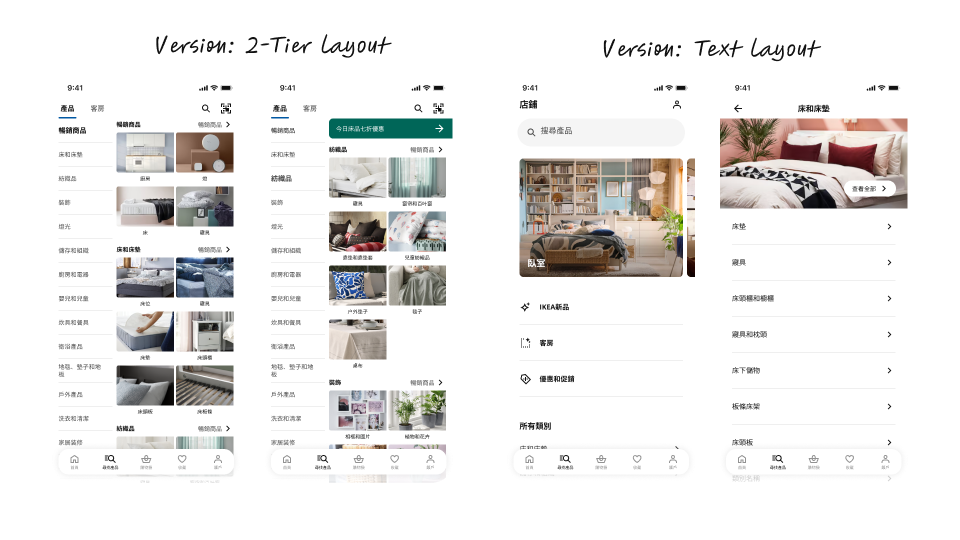
‍To uncover usability issues and determine user preferences for a two-tier layout vs. a text-only layout on the categories page.

Scenario

Imagine you’re using the IKEA app and want to add a duvet cover ("BERGPALM") or a blue pillowcase to your cart. How would you do it?‍

Key Research Questions
  • ‍How do users find the navigation?
  • What are users struggling with?
  • Which version do users prefer?
  • If the preferred version is launched, would users adopt it?
Checkout Page
Improved Address Book Functionality
Learnings
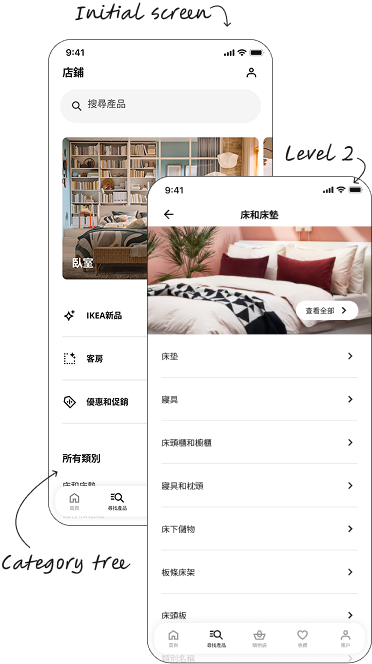
Text without images works when customers know what they are looking forRooms images on L1 attracts attention from the category tree belowCustomers tend to read all the category namesEveryone found the target product
What worked well
Cleaner and clearer layoutOne customer commented it was “more IKEA”
Area for improvements
- For some the L1 layout was unclear that it was possible to scroll down
Checkout Page
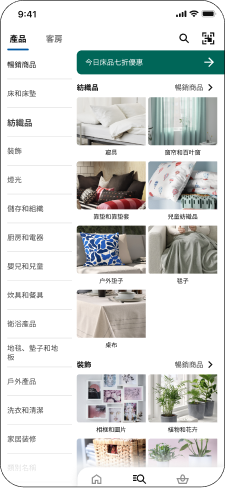
2-Tier layout
Learnings
The possibility to see two levels at once gave more focus to L2 categoriesRooms used to locate the productsAll customers found the product
What worked well
Simplified checkout journey, reducing frustration and improving user experience.
Conclusions for Test 1
  • All customers successfully managed to find the product using both versions.
  • The two-tier 
layout is the preferred version.
    The images and overview help the customer find the product quicker.
  • When customers 
know what they are looking for, they 
tend to prefer to 
use the search.
  • For the IKEA App
in Taiwan,
local needs are not as distant from global needs 
as initially
assumed.
Test 2: Call for a co-worker
Goal

Testing the concept of requesting assistance from a 
coworker from the app (excluding location tracking services and AI functionality).

Scenario

You have your app and are in need of co-worker assistance, how can you call on one from the app
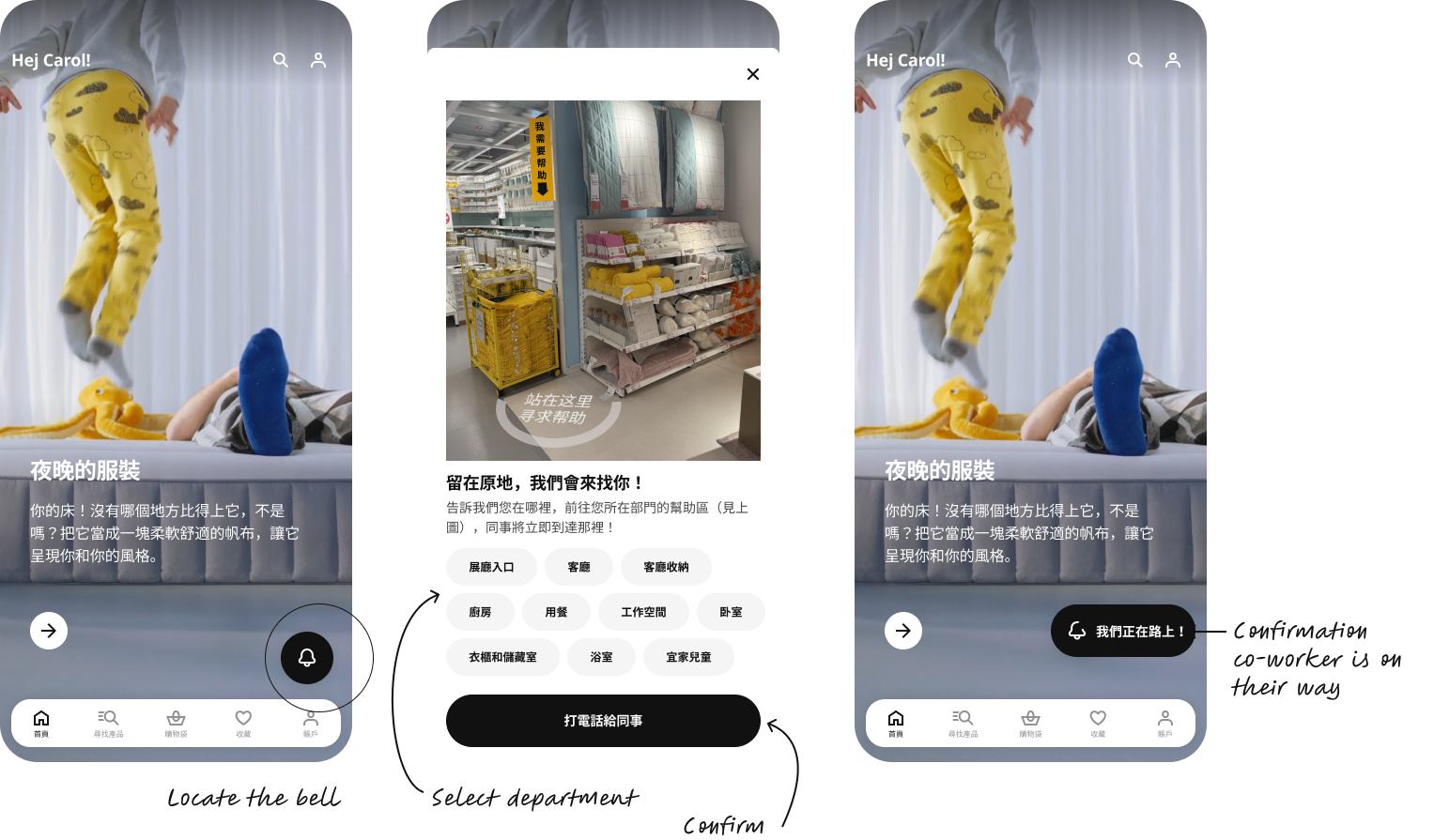
Key Research Questions
  • Have you ever had to locate a co-worker in the store? What was your experience?
  • If this feature was available in the IKEA app, would you use it?Why not, why yes?
  • Why not, why yes?
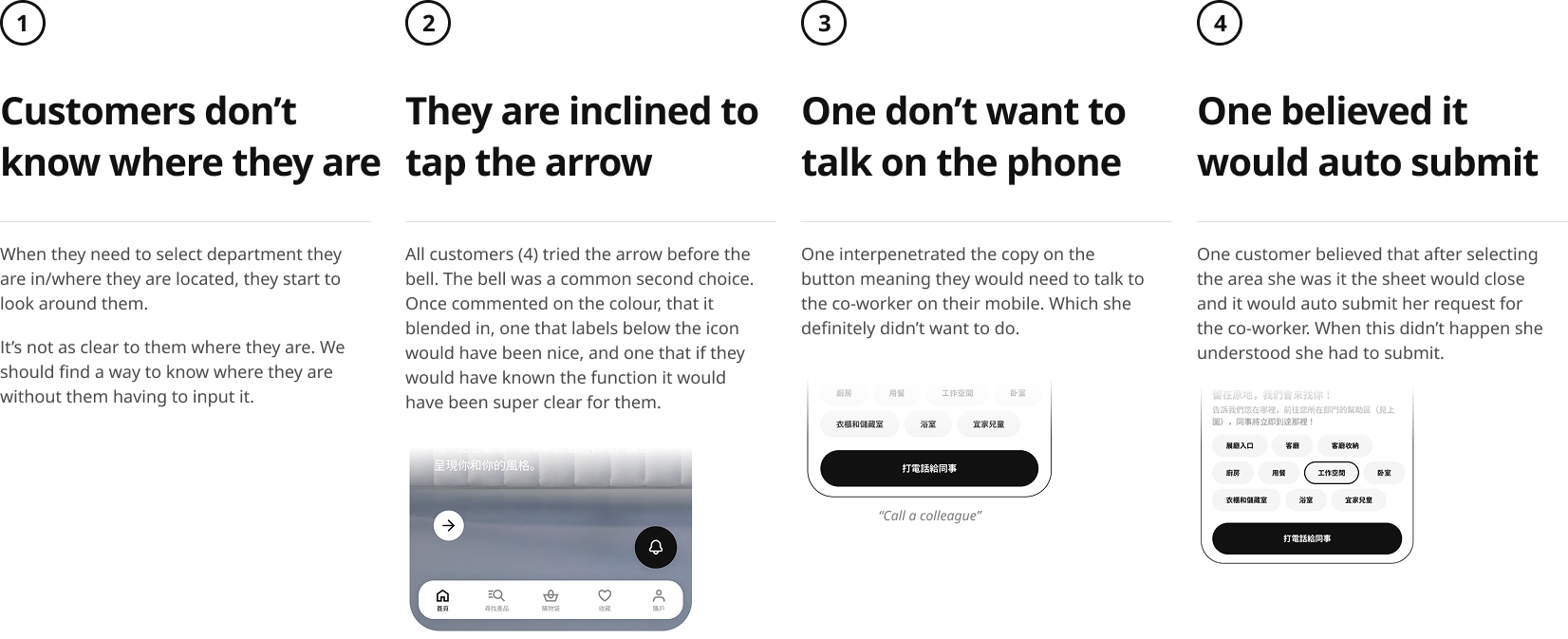
User findings
Conclusions for Test 2
  • The concept of being able to summon a 
co-worker to your location is appreciated by customers.
  • The possibility to receive assistance directly without looking around, 
in an easy way, 
is possibly the true user need.
  • Due to no location tracking and the shortness of 
co-workers, 
a solution to offload the co-workers should be the main focus.
  • Suggested follow-up: Investigate in solutions giving the customer a way to support themself quickly on the spot. Chatbot, AI etc.

_Evaluation

Key Principles
Did we meet our sprint goal?
  • Validated UI Concepts: Positive reviews from the customers when testing the prototype (80/20)
  • Backlog issues documented - targeted issues that are validated and assigned to the backlog
  • Coss-team alignment on priorities and a sense of direction
  • Post-sprint actions (incl. ownership) and clear next stepsrequired follow-up sessions or activities are set

_Next Steps

Key Principles
  • Continued iterations on the category layouts, aiming to bring the best of both worlds together (images and clearer/cleaner layout).
  • Continue the design collaboration, along with tweaking the UI for the rest of the app, bringing the different versions closer to each other.
  • Prioritise features for promotion across the app where promotions are most relevant and engaging the customer.
  • Potentially investigate in solutions giving the customer a way to support themself quickly, 
on the spot. (Chatbot, AI etc).
  • Validate all iterative design updates with continued user testing.