Checkout Revamp

Revamping IKEA's checkout process to enhance user experience and reduce cart abandonment.
USER RESEARCH
UI DESIGN
E‑COMMERCE
TIME FRAME
Q3 2024
ROLE
Product Designer
TOOLS
Figma
PLATFORM
Web (HK & TW)

_Overview

Background

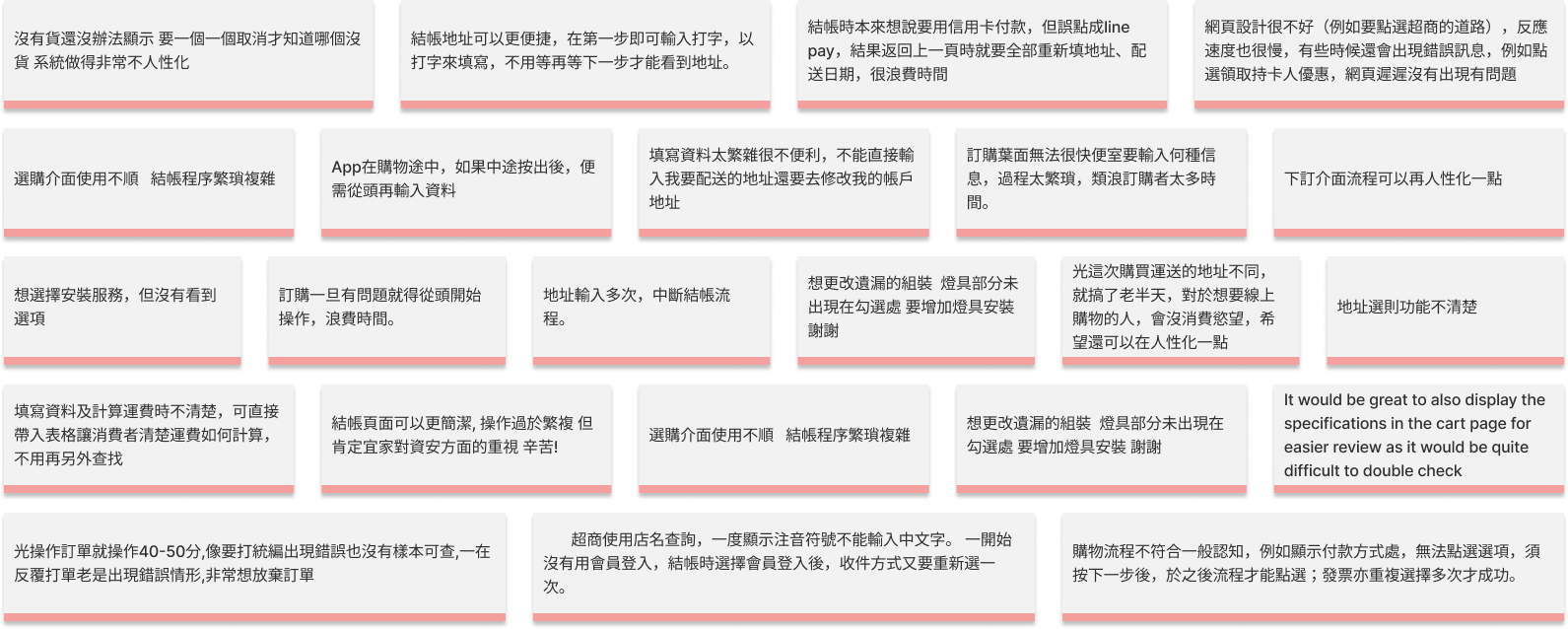
We have long been aware of the persistent pain point our users experienced with the current checkout flow. In fact, 12% of monthly user feedback specifically addressed issues with our checkout process. Therefore, undertaking this checkout revamp, our primary aim is to address these concerns and create a streamlined and user-friendly checkout experience that promotes smooth transactions and enhances overall customer satisfaction.
Objective

Simplify shopping cart & checkout flow (i.e. time and no. of steps), uplift of lower funnel conversion

-

4%

Average session duration

-

2%

Cart abandonment

+

2%

Conversion

_Discovery

Background

Our UX checkout revamp began by engaging with internal stakeholders, eg Solution, Ecommerce and Operation Teams, to understand their specific business requirements and concerns related to the checkout process. We conducted interviews and discussions to uncover existing challenges, desired improvements, and unique perspectives.

Interview with internal teams
Category
Product Team
in Millions
Web Merchandiser
per Sq KM
Operations
in Million of $
Solution
in Millions
Sales Team
in Millions
Store coworker
in UFOs
Page Length
1. Lengthy scrolling on pages
✅
✅
✅
✅
-
-
2. Checkout process with 7 excessive steps
✅
✅
✅
✅
-
-
3. Missing progress bar for tracking completion
✅
✅
✅
✅
-
4. Overloaded Terms and Conditions
✅
-
✅
-
-
-
5. Tedious address dropdown menu
✅
-
✅
-
-
-
6. Remove "Back to top" button from checkout
✅
-
✅
✅
-
-
Light Changes
7. Unclear floor selection
✅
✅
✅
-
✅
-
8. Navigation back to previous steps
✅
✅
✅
✅
-
✅
9. Address section lacks full details
✅
✅
✅
-
✅
-
10. Inconsistent "Next" button logic
✅
✅
✅
✅
-
-
11. Inconsistent confirmation button placement
✅
-
✅
✅
✅
-
12. Incomplete "Add to Wishlist" visibility
✅
✅
-
-
✅
-
13. Unclear delivery confirmation after adding address
✅
✅
✅
✅
-
-
14. Delayed display of delivery time options
✅
-
✅
✅
-
-
15. "Add to Wishlist" directly removes item
✅
✅
-
-
-
-
16. Unsatisfactory default delivery method
✅
-
✅
-
-
-
17. Difficulty identifying missing info errors
✅
-
✅
✅
-
-
18. Unclear mandatory field indicators
✅
-
✅
✅
✅
-
Heavy Changes
19. Align shipping, assembly, and wall mounting info
✅
✅
✅
-
-
✅
20. Improve recommended product placements
-
✅
-
-
✅
-
21. Ensure consistent amount confirmation
✅
✅
✅
✅
✅
✅
22. Clarify "Buy three, get one free" promo
-
✅
✅
-
✅
-
23. Remove repetitive delivery address entries
✅
✅
✅
✅
-
✅
24. Simplify receiver information display
✅
✅
✅
✅
-
-
25. Optimize screen space, declutter text
✅
✅
-
✅
✅
-
26. Display assembly info on cart page
✅
✅
✅
-
-
-
27. Clarify Payment icon purpose on mobile
✅
✅
-
-
-
✅
28. Streamline phone number entry
✅
-
✅
-
-
✅
29. Ensure "Next" button visibility on cart
✅
-
✅
-
-
✅
30. Minimize Header Bar to save space
✅
-
-
✅
-
-
31. Clearly display accepted payment methods
✅
-
✅
-
-
-
32. Include "Next" button after payment failure
-
✅
✅
✅
-
-
33. Assist with furniture dimensions
-
✅
✅
-
✅
-
Others
34. Shipping fees calculation at checkout
✅
✅
✅
✅
-
✅
35. Consolidate Step 2 and Step 3
✅
✅
✅
✅
-
-
36. Display cross sales without disruption
✅
✅
✅
✅
✅
-
37. Ensure clear Search Bar positioning
-
✅
-
-
-
✅
38. Recommendations for product knowledge
✅
✅
-
-
✅
✅
39. PIP reminders for wall mounting
✅
✅
✅
-
-
✅
40. Reserve space for future features
✅
✅
-
-
-
✅
41. Enable cart and list sharing
✅
✅
✅
-
-
-
42. Full-width font and Chinese character recognition
✅
-
✅
✅
-
-
43. Slow and unstable cart entry speed
-
-
✅
✅
-
-
44. Excessive products causing slowdowns
-
-
✅
✅
-
-
45. Add "Select All" for assembly products
✅
-
✅
✅
-
-
46. Merge cart items when logged in
✅
✅
✅
✅
-
-

Additionally, we conducted interviews with 12 diverse external users to gather deep insights into their behaviors, pain points, motivations, and preferences during checkout. This research revealed common pain points such as confusing steps, slow loading times, and a lack of trust indicators. By combining insights from stakeholders and users, we identified key areas for improvement. This discovery process formed the foundation for our user-centric UX checkout revamp, addressing specific pain points and meeting both stakeholder requirements and user needs.

_Problems

Background

User interviews have uncovered a range of challenges within our checkout process. To streamline our design decisions efficiently, we  categorized these issues based on their importance and viability. Following thorough deliberation, we have decided to concentrate our efforts on the following key areas:

1. Checkout Flow Optimization: Streamlining the overall checkout process for enhanced efficiency.
‍2. Delivery Method Selection: Enhancing the experience of choosing delivery options.
‍3. Address Book Functionality: Improving the functionality and user-friendliness of the address book feature.
‍4. Assembly Service Selection: Simplifying the process of selecting assembly services during checkout.

_Design

Key Principles

Simplicity: Simplify the checkout process by minimizing steps, form fields, and distractions for a seamless user experience.

Clarity: Ensure clear communication in the checkout process with descriptive labels, error messages, and tooltips to guide users.

Visual Hierarchy: Create a clear visual hierarchy to guide users' attention to understand the flow and importance of each step.

Design exploration

Given the large scale of this project, my teammate and I recognized the importance of a systematic approach. To begin, we focused on the basic layout of the checkout flow, visualizing our different ideas through wireframes. We conducted multiple meetings to evaluate and discuss the various options, considering factors such as usability, user flow, and alignment with project objectives. This collaborative process allowed us to gather insights, weigh the pros and cons of each approach, and make informed decisions for the next steps of the checkout revamp.
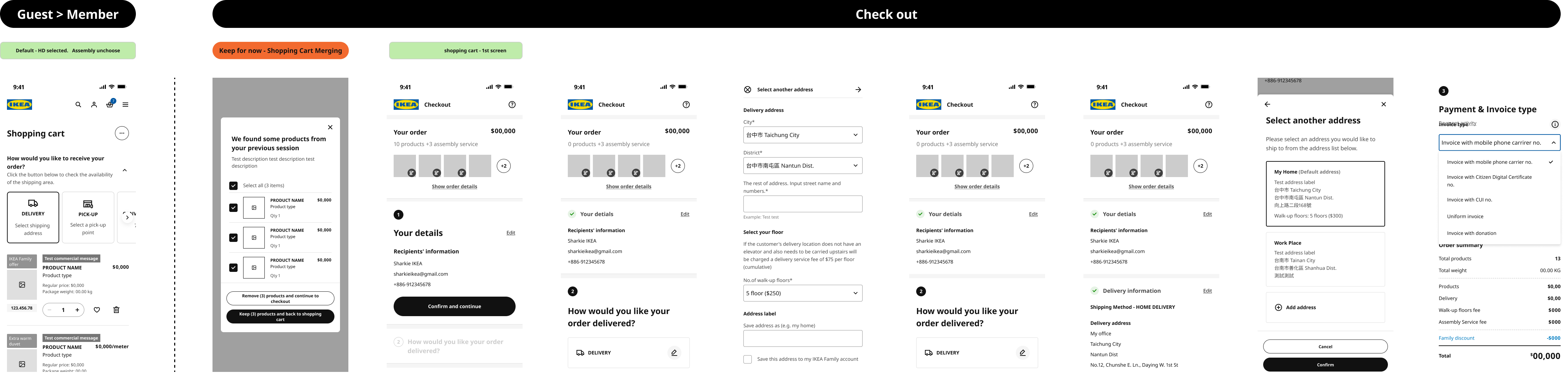
After obtaining consensus on the initial layout from various stakeholders, we expanded our wireframes to encompass a range of scenarios and edge cases.
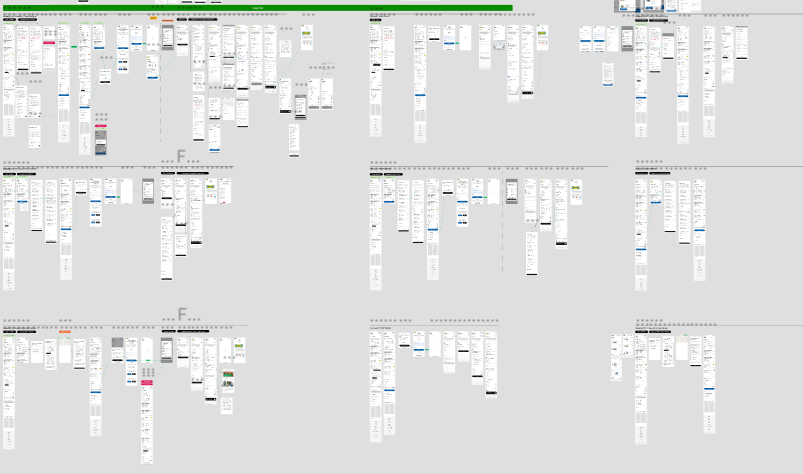

During the checkout revamp project, we made significant changes to address user pain points and improve the overall user experience. Key modifications included:

Checkout Page
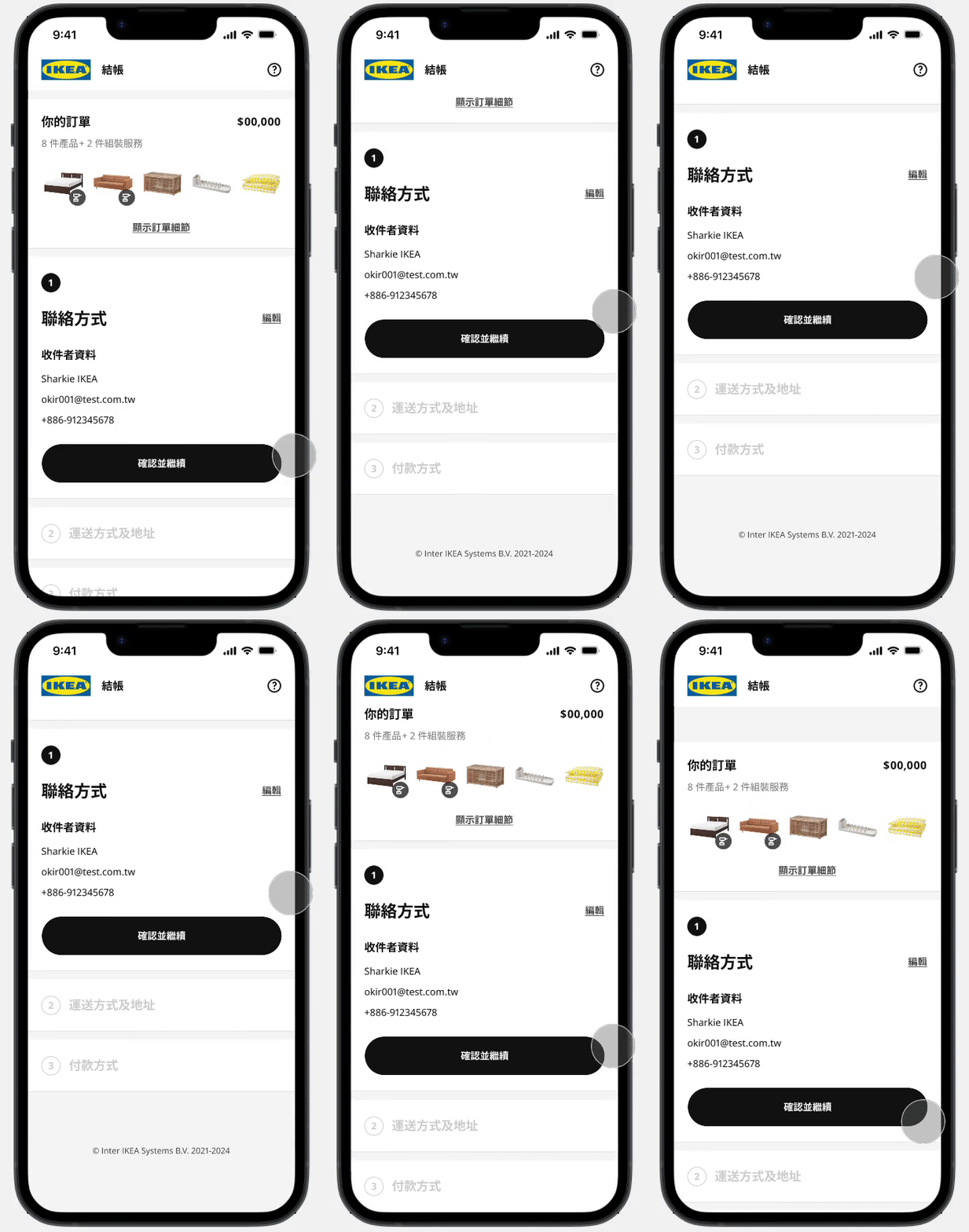
Shortened Checkout Flow

Before

After

Issue:
Users experienced inconvenience and frustration with a cumbersome three-page checkout process that required navigating back and forth for verification.
Enhancement:
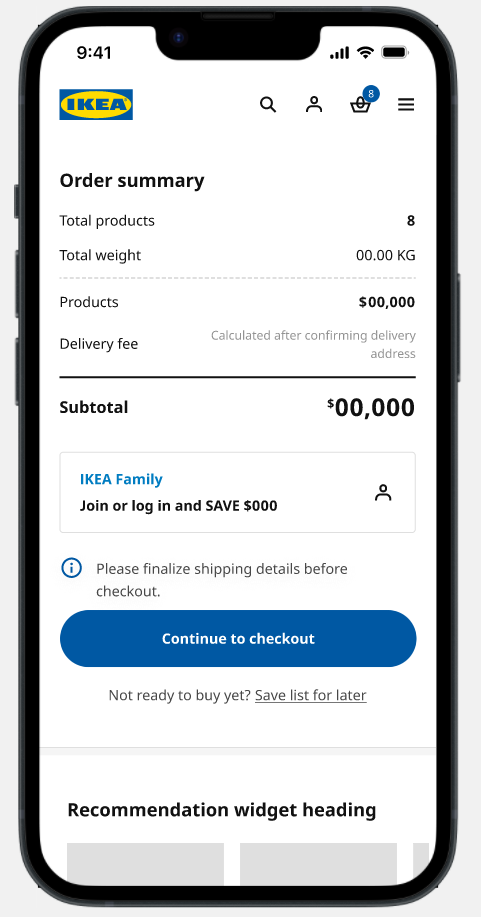
- Consolidated checkout into a single page.
‍
- Displayed entered details prominently for easy reference.
Expected Outcome:
Simplified checkout journey, reducing frustration and improving user experience.
Checkout Page
Improved Address Book Functionality

before

After

Issue:
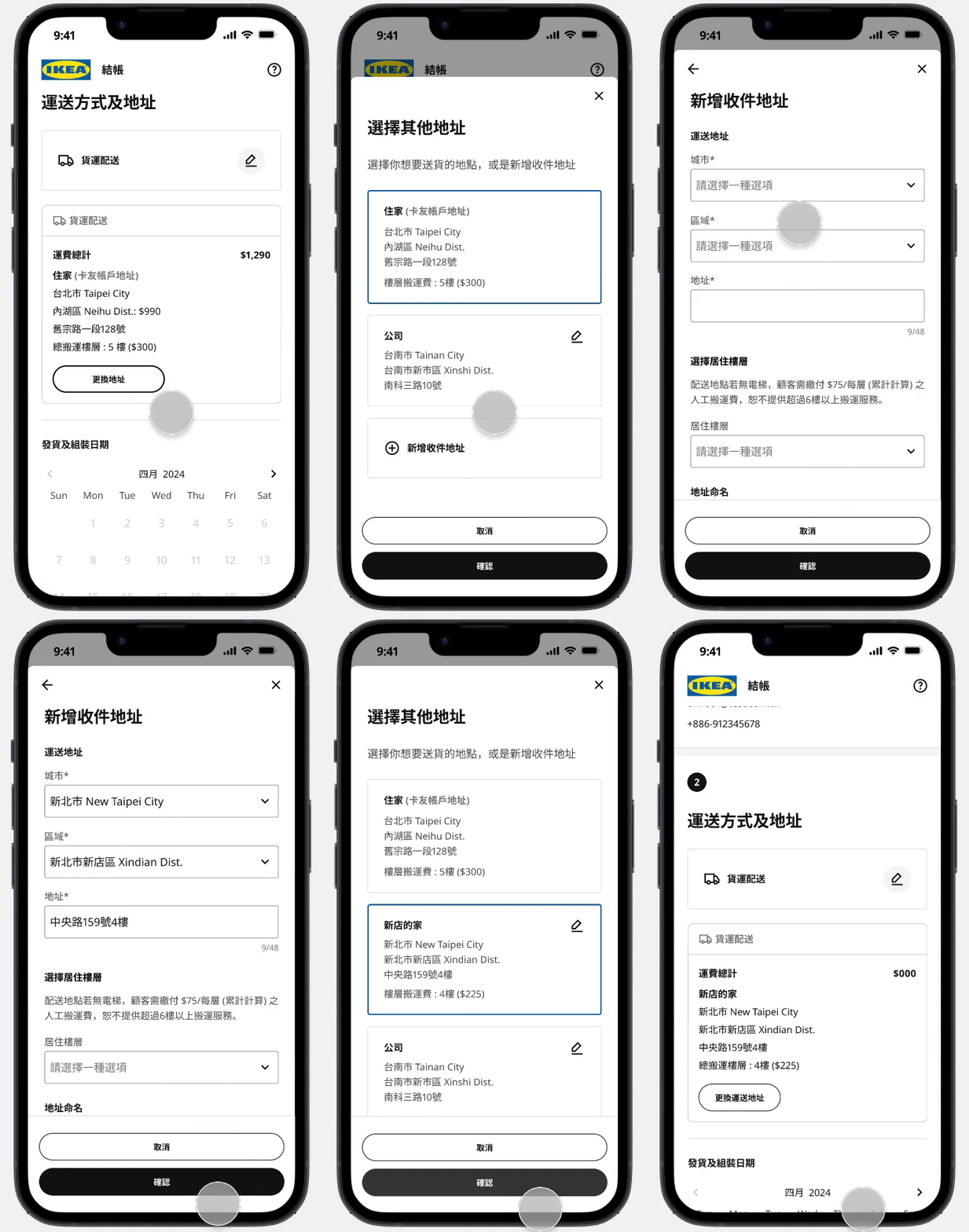
- 44% of users expressed difficulty changing addresses due to an unintuitive interface and a misleading flow.
Improvements Implemented:
- Revamped the Address book interface to enhance usability.
- Streamlined the flow for a more intuitive address management process.
Expected Outcome:
- Provide users with a smoother and more intuitive address management process.
Checkout Page
Shortened Checkout Flow

Before

After

Cart Page
Opting for Delivery Method
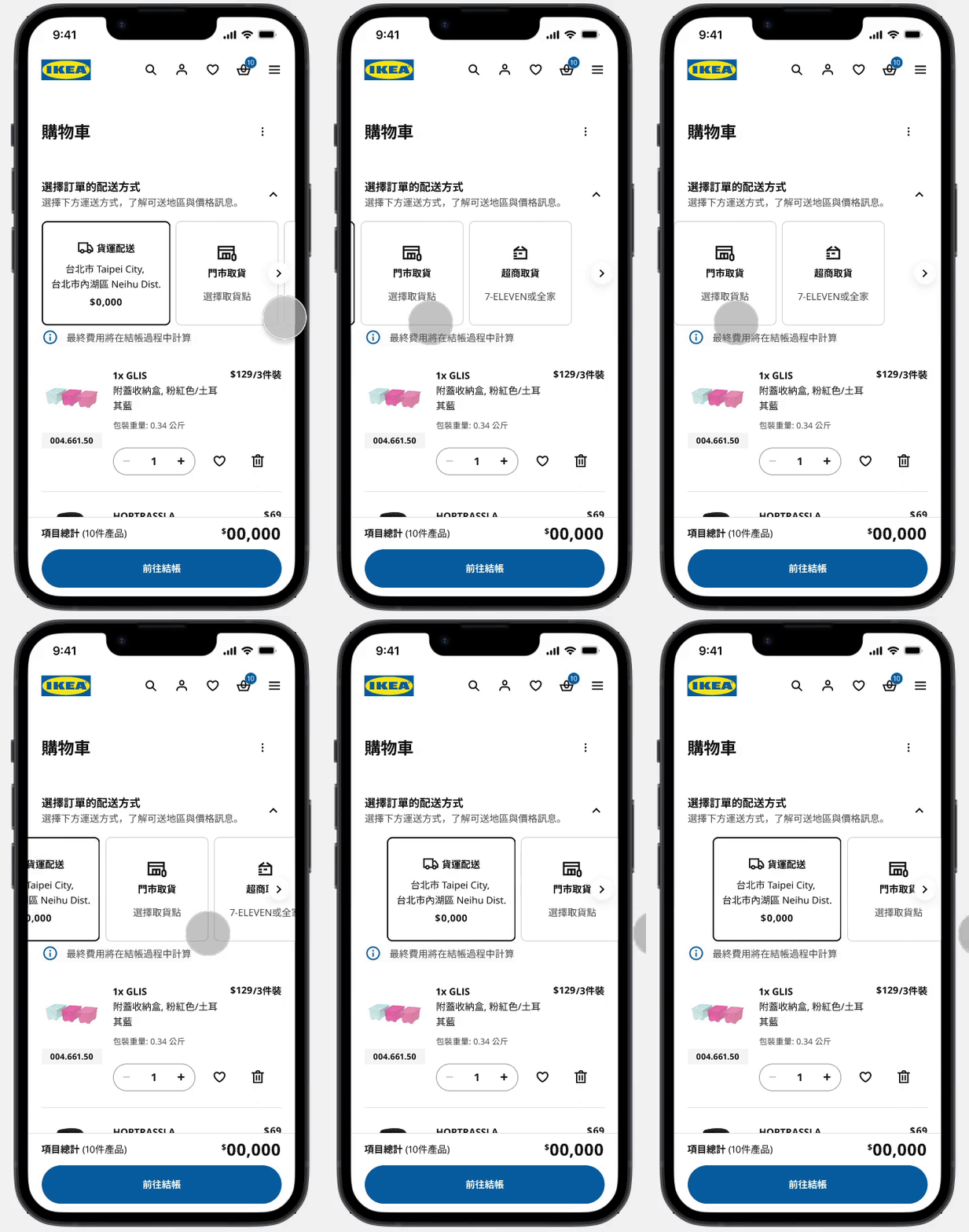
Previously, users chose their delivery method after reviewing cart contents, potentially leading to availability issues, especially with options like convenience stores having size constraints.

With the updated approach, selecting the delivery method at the beginning boosts convenience and efficiency. By prioritizing this decision upfront, we proactively address availability concerns, empowering users for a smoother shopping journey.
Checkout Page
Shortened Checkout Flow

Before

After

Checkout Page
Choosing Assembly Services
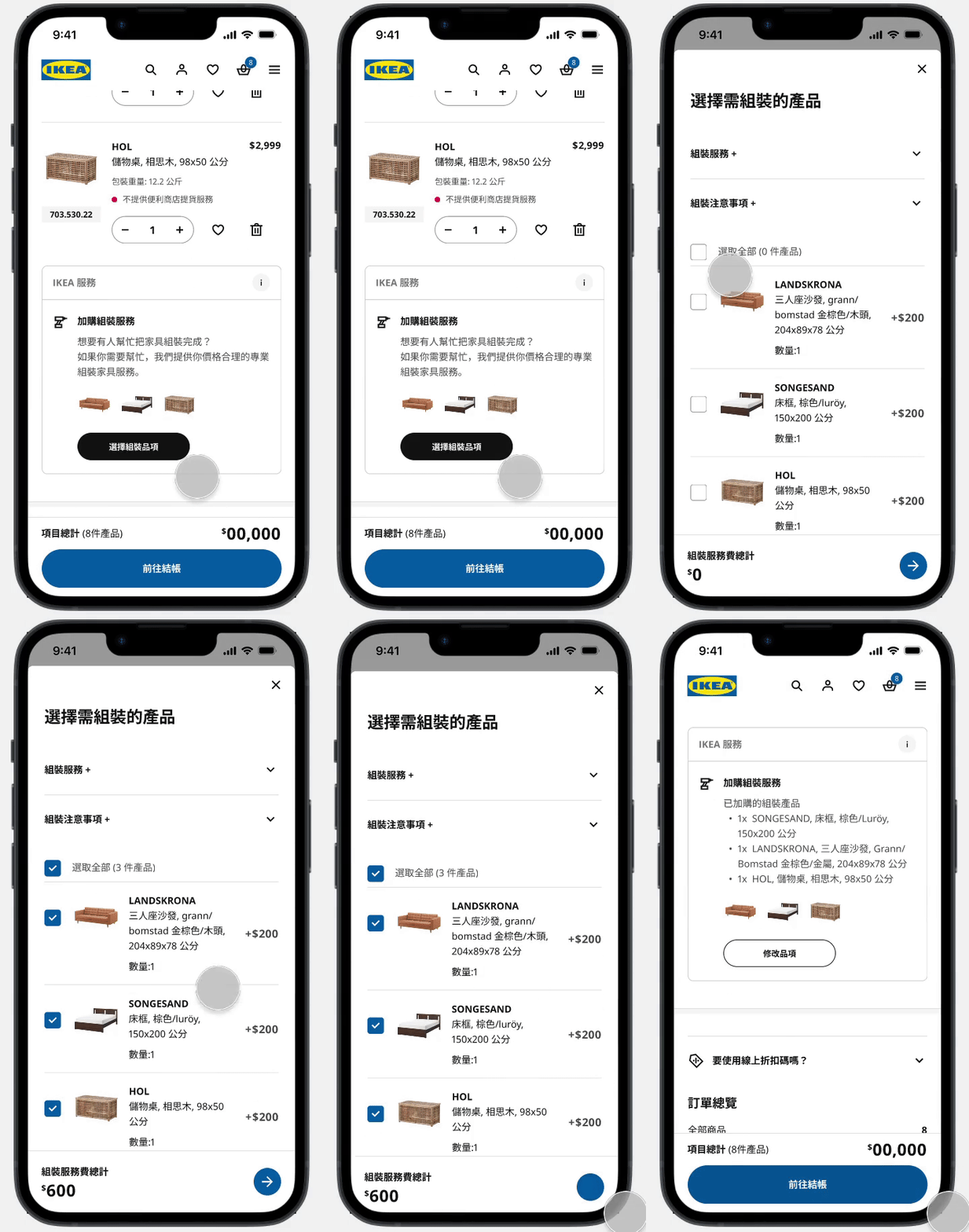
Previously, users could only opt for assembly services at the final checkout stage, leading to concerns about hidden costs as prices were revealed late in the process.

In the updated version, users can now easily view assembly prices on the cart page, enabling them to proceed with the total sum upfront, without any additional costs. This enhancement fosters transparency and a seamless user experience.
Validation

Following the final design approval from the product team, we conducted usability tests to validate our design choices and identify any potential usability issues.We had 8 experienced online shoppers, ranging from ages 25 to 64, participate in the tests. Half of them were new users, while the others had previously shopped on other competitor's platforms.

During the tests, 80% of the participants were able to successfully complete the test scenarios, including store pick-up, home delivery, convenient-store pick-up, and out-of-stock flow. The checkout completion time was reduced by 20%.

Overall, the usability tests received positive feedback, with users finding the checkout process efficient. However, we did uncover some areas that need improvement:

Before
After
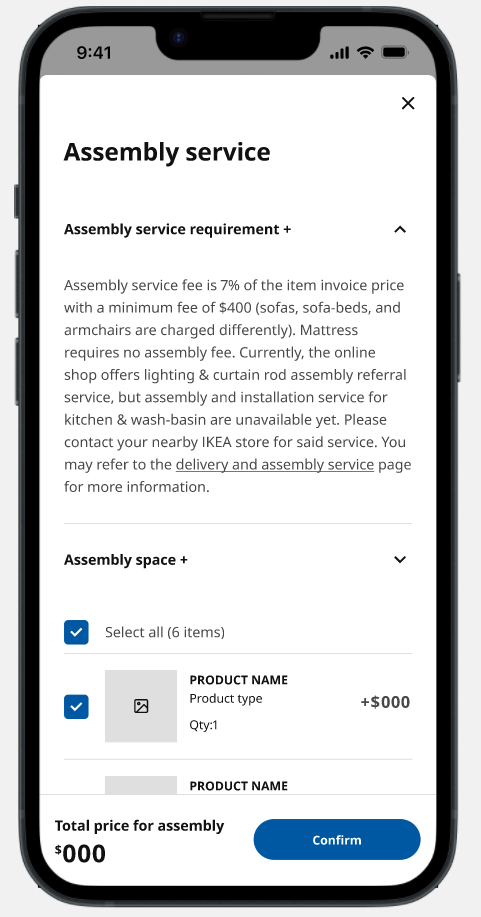
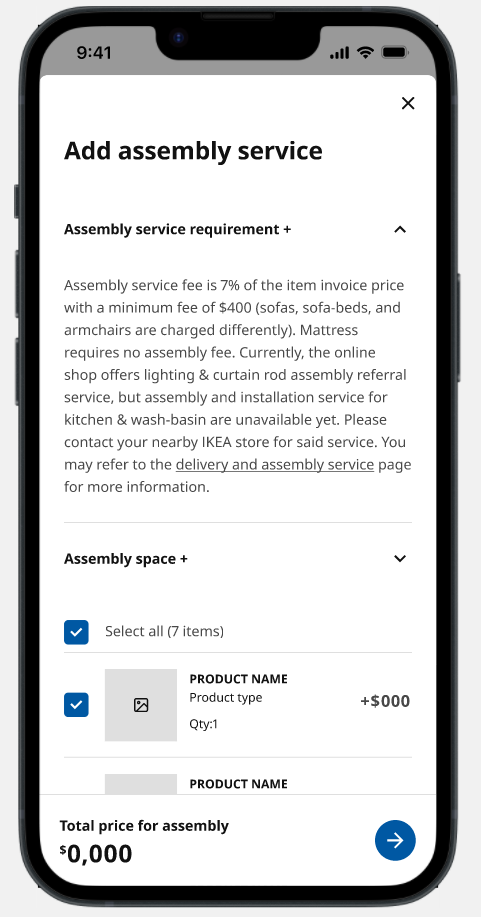
Usability Test Findings:
During testing, five users had difficulty identifying the confirm button and ended up clicking outside the designated area.
Updates:
To address this issue, we have replaced the arrow with a more intuitive and direct confirm button, enhancing user understanding and interaction with the feature.

Before

After

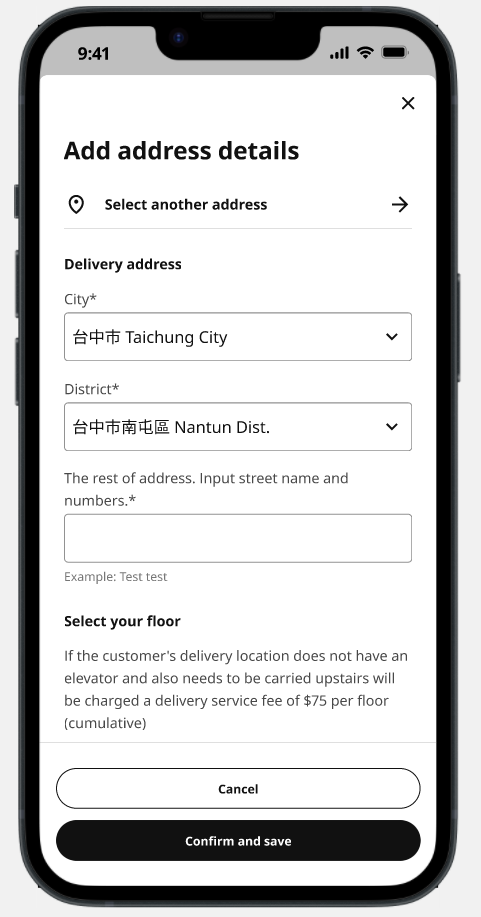
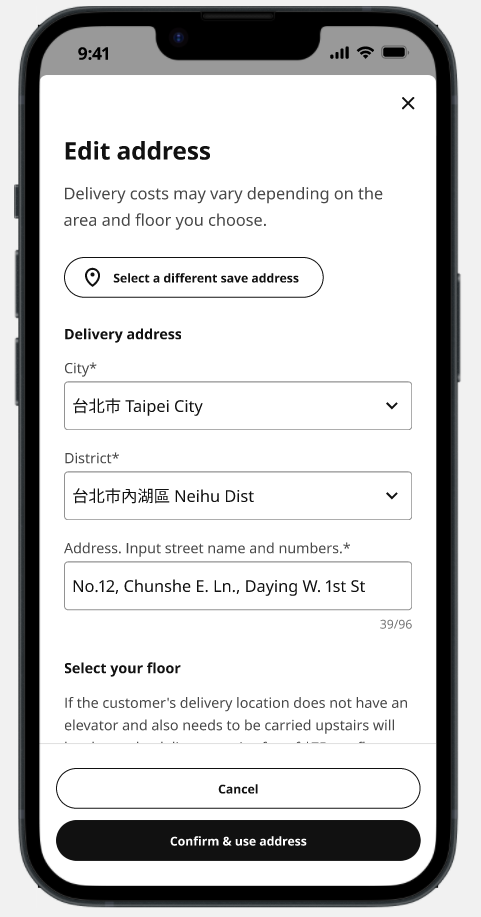
Usability Test Findings:
During testing, participants were unable to locate the "select another address" option when they needed to adjust their shipping details.
Updates:
In response to this feedback, we have transformed the option into a secondary button and relocated it lower on the page to enhance visibility and ensure ease of access for users.

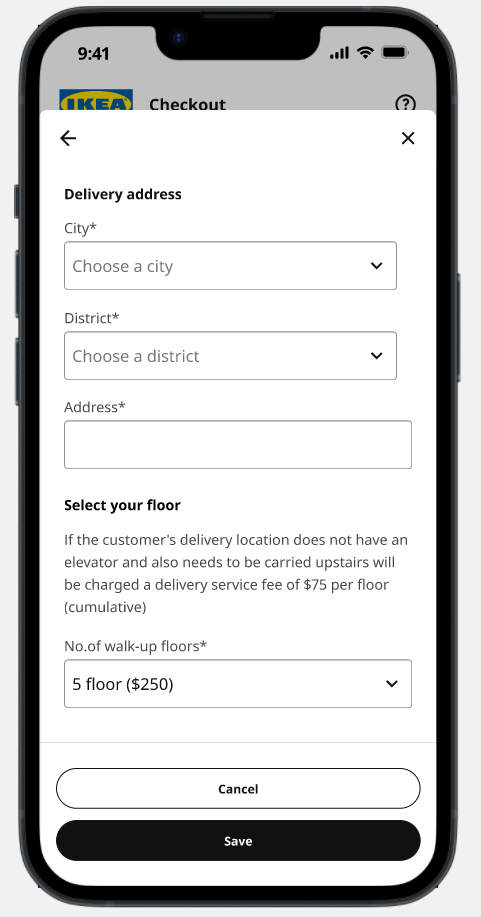
Before

After

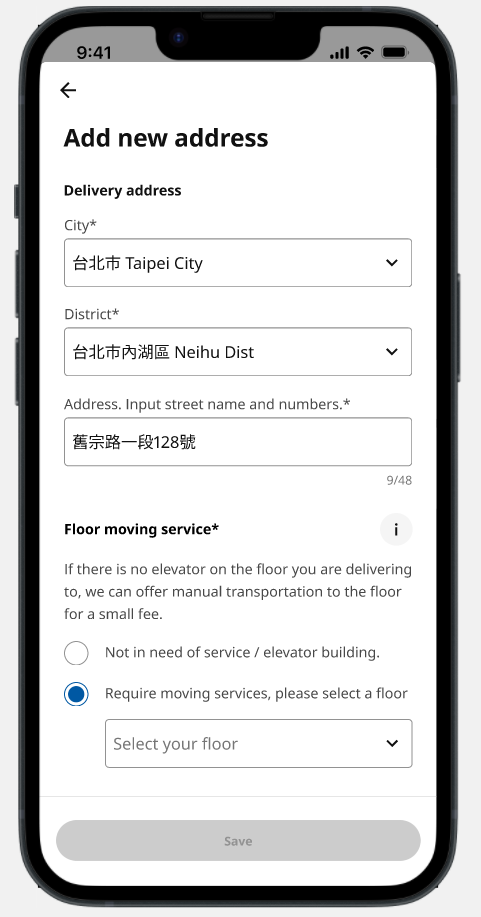
Usability Test Findings:
Some participants found the section confusing when residing in a walk-up floor but not requiring floor moving services. Additionally, 74% of Taiwanese users do not opt for floor moving services.
Updates:
To address this issue, we have replaced the drop-down list with radio buttons, allowing users to easily opt out of floor moving services. Furthermore, we have refined the wordings to enhance clarity.

before

After

Usability Test Findings:
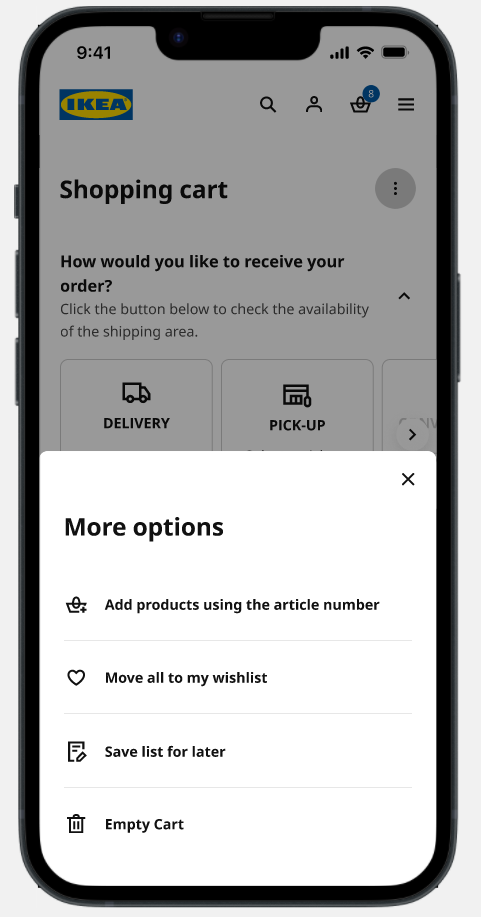
80% of users struggled to associate the vertical ellipse icon with "more options."
Updates:
Upon reviewing the low usage of functions within the "more options" menu (0.1% over six months), we have decided to eliminate all options except for the "save list for later" function.
Finetuning

_Results

Post-revamp impact

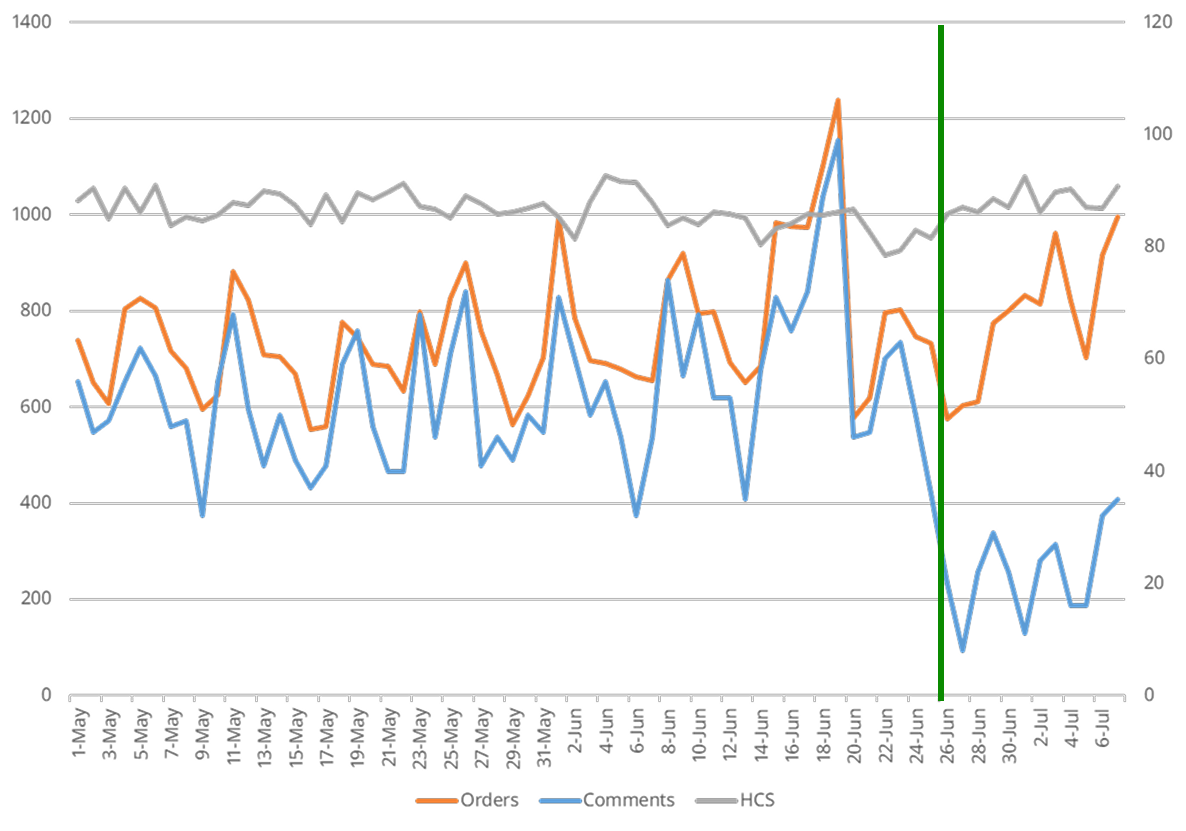
Significant drop in comments post-checkout revamp, aligning with order trends.
HCS peaked at 90 on July 4 and July 7.

User complaints regarding the cart have dropped to 0%.
Checkout issues decreased from 22% to 10%, which are mainly bugs and were promptly addressed by Product and Solution Teams.
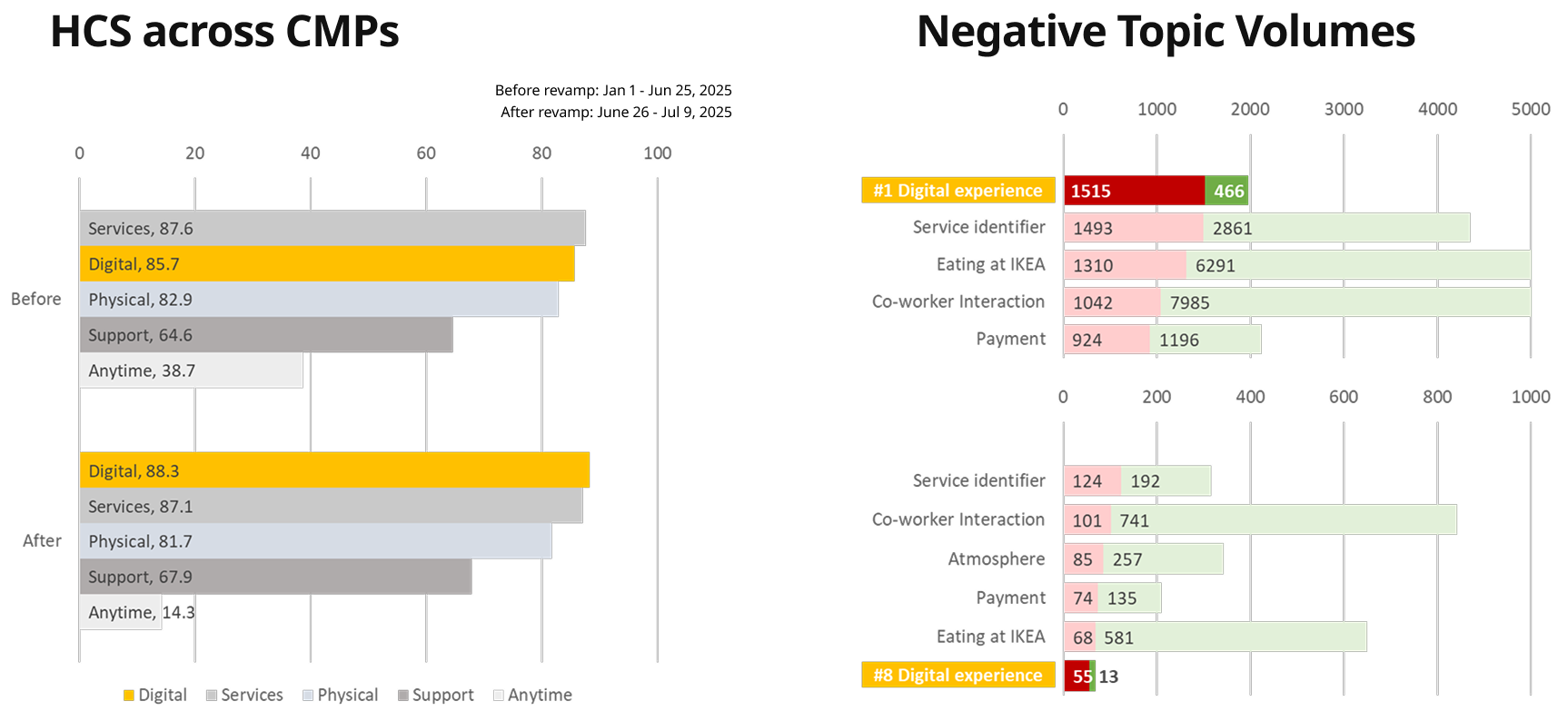

Increased ranking among other customer meeting points (e.g. physical stores) and less negative topic volume recorded.

Takeaways

Documentation is Crucial: During the project, I documented each design decision in a centralized repository. This proved invaluable when revisiting discussions with stakeholders who had questions about specific design choices. It ensured consistency and clarity throughout the project.

‍Effective Communication with Stakeholders: Regular updates and feedback sessions with stakeholders helped align expectations and incorporate their insights early. This proactive communication reduced last-minute changes and ensured a smoother implementation process.

‍User Testing is Key: Conducting usability testing with real users before finalizing the design revealed critical friction points in the checkout flow. Addressing these issues led to a 15% decrease in cart abandonment rates.